

Google’s AdSense allows bloggers to add adverts to their blogs and get paid for them, the payment you receive depends on how many views your blog receives & where you stick your adverts. Getting the right amount of adverts can be tricky, too many adverts can be annoying if they’re more intrusive than informative. Google does allow you to automatically add adverts but this can sometimes spoil the look of a blog post as they can be placed in seemingly random places.
I added all the ad’s on my WordPress site myself & I did it in three easy steps.
Register For Adsense.
The first step is really easy, go to the AdSense part of the Google Website, and register for an account using an email account or google account. You should be asked for your site URL which google will verify & a bank account for your payments.
Add a TXT File To Your Website
The second part is that Google will ask you to add a TXT file extension to your site called Ads.txt so they can keep track of the adverts etc. The easiest way to do this is to add a plugin called Ads.txt manager which will allow you to add & edit the file from your WordPress dashboard.
Placing The First Advert
Google refers to ads as Ad Units, they have four types to choose from.

You have Display ads that work pretty much anywhere on a page on your site. In-Feed ads are designed to fit in between posts & listings. You also have In-Article ads which are designed to fit within the article that someone would be reading. I added one above as an example. Finally, you have Multiplex adverts which are a grid-based display of multiple adverts. Display ad units and Multiplex ad units are great as they’re AMP friendly which means they’ll look good on a mobile phone, even though Google is phasing out accelerated mobile pages.
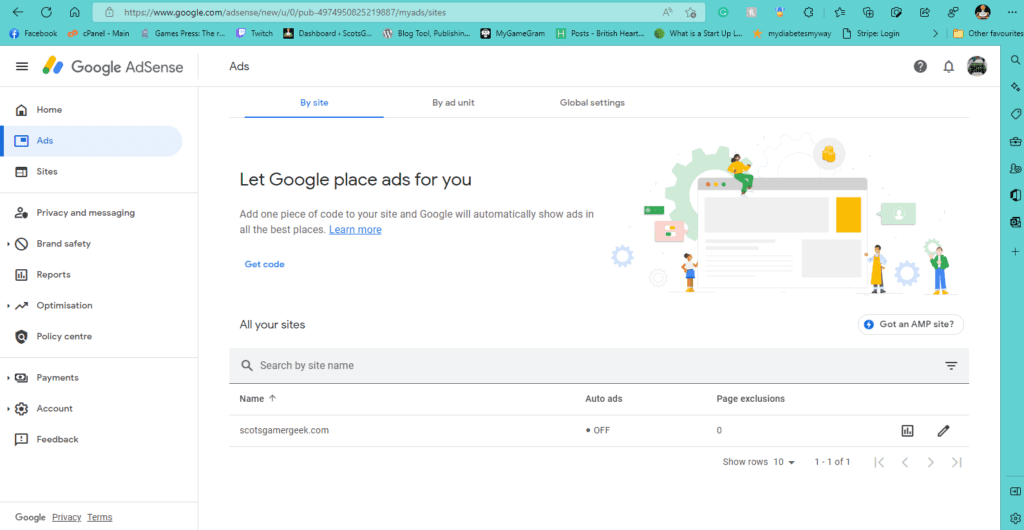
There are 2 options, adding by site or by ad unit. Adding by site means you place some HTML code in the header tags of the main page & Google does the rest or you create an ad unit from the four above. i prefer the ad unit as it gives more control. The ad unit selection gives you some HTML that matches the type of ad you pick which can be added in WordPress as a Custom HTML block

All you have to do is copy & paste the code into the block & you’re good to go, you can even save the block as a reusable one so you can add it to future posts.
